PithHelmet Menu
Links and Downloads
Documentation
Download
PithHelmet-2.8.5.tbz (Safari 4.x only)
PithHelmet-2.8.4.tbz (Safari 3.2 only)
PithHelmet-2.8.3a.tbz (Safari 3.1.x only)
PithHelmet-2.7.tbz (10.4 with Safari 3)
PithHelmet-2.6.7.tbz (10.4 only)
Purchase your copy today for only
Wiki Support
 Latest News
PithHelmet Bugs
PithHelmet FAQ
PithHelmet Features
PithHelmet Installation
PithHelmet Localization
Older Software Versions
PithHelmet-2.4.2.tbz (10.3.9 only)
PithHelmet-2.3.3.tbz (<= 10.3.8 only)
Ancient Software Versions
PithHelmet-0.7.3.tbz (Panther only)
PithHelmet-0.7.1.tgz (v85.x only)
PithHelmet-0.6.1.tgz (v74 only)
PithHelmet-src-0.7.2.tgz (source only)
Older Site Versions
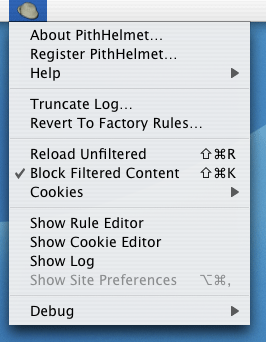
- Help
- Links to a few helpful sites for building blocking rule and understanding regular expressions.
- Block Filtered Content
- Command-Shift-K
turns PithHelmet on/off - Reload Page Unfiltered
- Command-Shift-R
reloads the current url with PithHelmet disabled temporarily - Truncate Log...
- Deletes the PithHelmet log file if you feel it is getting too large
- Revert To Factory Rules...
- Creates a backup of the current rules and then restores the current rule set to the latest version of the factory rules
- Cookies
-
- Purge Cookies...
- unimplemented
- Purge Session Cookies
- Deletes all cookies that have been flagged as temporary or "session only." These are normally deleted when the browser is quit.
- Purge Cookies For <site>
- Deletes all cookies for the current site.
- Show Rule Editor
- epynonymous
- Show Cookie Editor
- This is more of a cookie "viewer" for now. Most of the fields cannot actually be edited at this point.
- Show PithHelmet Log
- Opens the log file in the Console.app
- Show Site Preferences
- Opens a site preference rule for the current site - if there isn't one, a new rule is created with the current default settings.
- Debug
- Vestigial functionality from the development process. You can largely ignore this menu unless you are supremely curious.
Contextual Menus
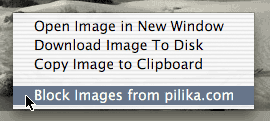
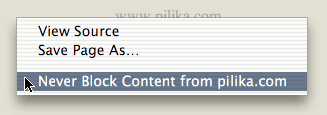
- Block Images from this Server (contextual menu)
- Right-Click (Control-Click) on Image
adds a new Block rule for the server hosting the current image - Never Block Content from this Server (contextual menu)
- Right-Click (Control-Click) on Page background (not an Image or a Link)
adds a new Exempt Site rule for the domain name of the current site