PithHelmet Preferences Pane
Links and Downloads
Documentation
Download
PithHelmet-2.8.5.tbz (Safari 4.x only)
PithHelmet-2.8.4.tbz (Safari 3.2 only)
PithHelmet-2.8.3a.tbz (Safari 3.1.x only)
PithHelmet-2.7.tbz (10.4 with Safari 3)
PithHelmet-2.6.7.tbz (10.4 only)
Purchase your copy today for only
Wiki Support
 Latest News
PithHelmet Bugs
PithHelmet FAQ
PithHelmet Features
PithHelmet Installation
PithHelmet Localization
Older Software Versions
PithHelmet-2.4.2.tbz (10.3.9 only)
PithHelmet-2.3.3.tbz (<= 10.3.8 only)
Ancient Software Versions
PithHelmet-0.7.3.tbz (Panther only)
PithHelmet-0.7.1.tgz (v85.x only)
PithHelmet-0.6.1.tgz (v74 only)
PithHelmet-src-0.7.2.tgz (source only)
Older Site Versions
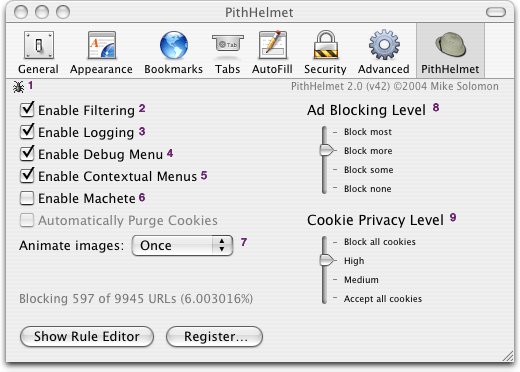
- Bug Icon
- Report a bug to me via email - this automatically fills out version info for Safari and PithHelmet
- Enable Filtering
- Toggles the PithHelmet filtering engine on and off. This is the same as using the PithHelmet menu.
- Enable Logging
- Writes all PithHelmet actions to a log file
~/Library/Application Support/PithHelmet/PithHelmet.logIt can be useful to tell you which URL's PithHelmet is blocking - useful to me because I can generate prioritized rules based on how often a rule causes a block/allow action. - Enable Debug Menu
- Somebody wrote an application that basically just turned on the built-in Safari menu and then demanded cash for it, something around $10. Needless to say, that is dumb. It rubbed me the wrong way, so I included this option to turn the Debug menu on/off. This requires you to restart Safari for the option to take effect.
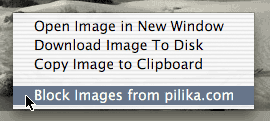
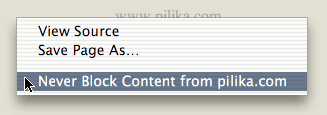
- Enable Contextual Menus image, page
- Adds a contextual menu item to allow images to be blocked with a single click, or prevent a site from blocking ads. This requires you to restart Safari for the option to take effect.
- Enable Machete - (advanced users)
- Enables the filtering engine to transform the HTML for a particular web site. This requires you to restart Safari for the option to take effect.
- Animate Images
- This can alter the number of times GIF animations play - Alway (default), Once or Twice (the entire animation will play only once or twice) or Never (the first frame of the animation will be shown, but there will be no animation).
- Ad Blocking Level
- This changes the amount of content that will be blocked by the various default rules. "Block none" basically turns off most of PithHelmet, "Block most" is pretty extreme - I like "Block more" personally.
- Cookie Privacy Level
- This alters the strategy for blocking and accepting cookies to defeat online tracking mechanisms.